AI AutomationBy Abdul Rahman20 May 20263 min read
Building AI Agents with Tool Calling: Patterns That Work in Production
AI agents are moving from demos to real products. The architecture of a tool-calling agent, how to design tools models use correctly, and the guardrails that keep agents safe.

An AI agent is a language model that can take actions: it reads a goal, chooses a tool, observes the result and decides what to do next — repeating until the task is complete. Agents are now shipping in real products, from support automation to internal operations assistants.
I've built agents both in workflow tools and in code — including a personal assistant in n8n that manages calendar events, email, expense tracking in Google Sheets, notes and tasks from natural-language requests. The same principles apply at every scale.
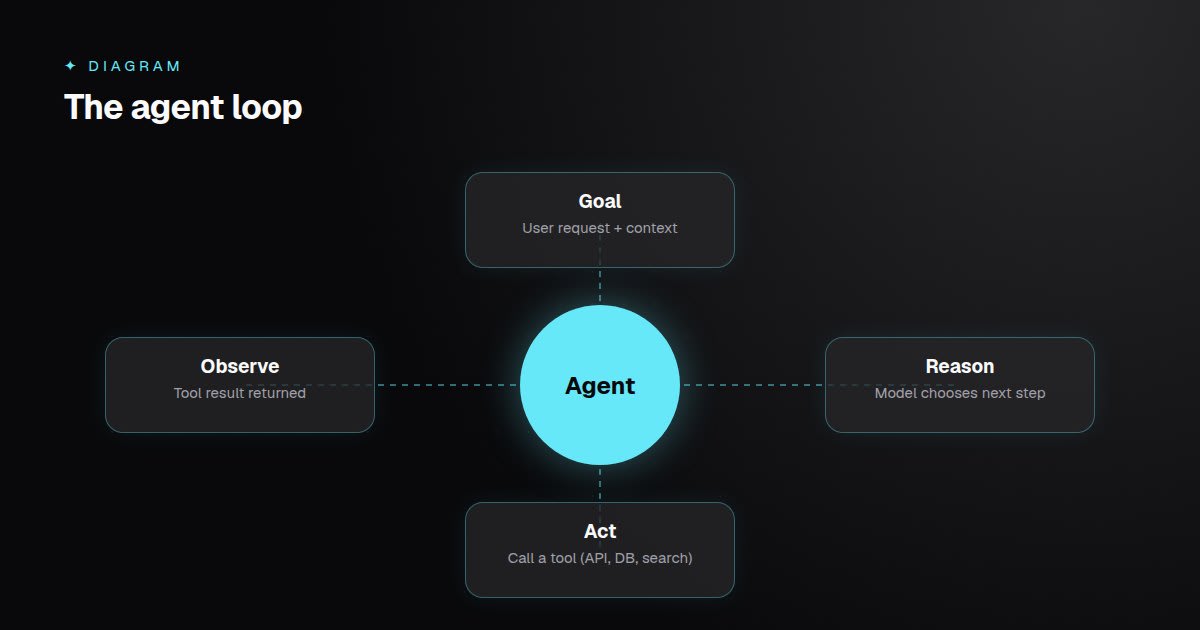 The model decides; your code executes. The loop ends when the model answers or a limit is reached.
The Agent Loop
Every agent follows the same cycle:
- The model receives the goal, conversation history and a list of available tools.
- It either answers directly or requests a tool call with structured arguments.
- Your code executes the tool and returns the result.
- The model continues with the new information.
The model never executes anything itself — your code stays in control of what actually runs.
Tool Design Is Prompt Design
Most agent failures are tool-design failures. A tool definition is effectively documentation for the model:
const addExpense = {
  name: "add_expense",
  description:
    "Record a new expense. Use when the user says they spent money. " +
    "Do not use for income or transfers.",
  input_schema: {
    type: "object",
    properties: {
      amount: { type: "number", description: "Amount in PKR, e.g. 1500" },
      category: { type: "string", enum: ["food", "transport", "bills", "other"] },
      date: { type: "string", description: "ISO date, YYYY-MM-DD" },
    },
    required: ["amount", "category", "date"],
  },
};
Principles:
- One job per tool.
create_taskanddelete_taskbeat a vaguemanage_tasks. - Say when to use it — and when not to.
- Constrain inputs with enums, formats and examples.
- Return useful errors the model can recover from ("date must be YYYY-MM-DD").
Memory and Context
Short-term memory is the conversation history; it lets users say "move it to 4 pm" after creating a meeting. Long-term memory — preferences, past decisions — is better stored explicitly in a database and retrieved when relevant, rather than stuffed into every prompt.
Guardrails
Autonomy needs limits:
- Least-privilege tools. Give the agent only the capabilities the task requires.
- Human confirmation before irreversible actions such as sending email, deleting data or making payments.
- Step and cost limits so a confused agent can't loop indefinitely.
- Validate arguments in code before executing any tool call.
- Treat tool outputs as untrusted — web pages and emails can contain instructions aimed at the model.
Observability
Log every step: the model's decision, tool name, arguments, result and latency. When an agent misbehaves, this trace shows exactly where reasoning went wrong. Build a small set of test scenarios and replay them whenever you change prompts, tools or models.
Workflows or Agents?
Not every automation needs an agent. If the steps are known in advance, a deterministic workflow is cheaper, faster and easier to test. Use an agent when the path genuinely depends on the input — and combine both: agents for decisions, workflows for execution.
Key Takeaways
- Agents loop through reason → act → observe, with your code executing every action.
- Tool descriptions and schemas determine most of an agent's accuracy.
- Add confirmations, limits and argument validation before giving agents real power.
- Log every step and prefer plain workflows when the path is predictable.