AI AutomationBy Abdul Rahman05 Aug 20263 min read
AI Workflow Automation with n8n and LLMs: From Manual Tasks to Pipelines
Combining workflow automation with language models removes hours of repetitive work. Real patterns from my n8n projects — triggers, AI steps, branching and reliable outputs.

The fastest way to get value from AI inside a business is rarely a chatbot. It's automation: taking a repetitive process — triaging emails, summarising documents, updating spreadsheets — and adding a language model at the one step that previously needed human judgement.
Workflow tools such as n8n make this approachable. I've built several such workflows, from a simple feedback router to an AI code analyzer and a personal assistant agent, and the same patterns keep recurring.
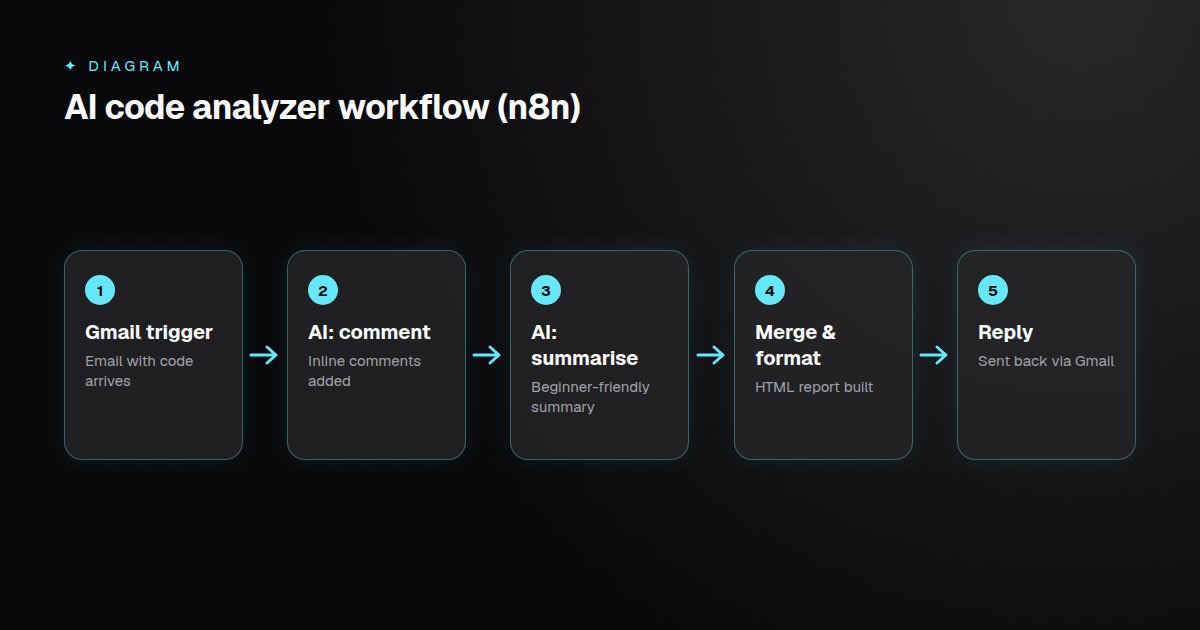 A deterministic workflow with focused AI steps: trigger, analyse, merge, format, deliver.
Pattern 1: Trigger → Decide → Act
The foundational shape of any automation:
- Trigger — a form submission, incoming email, webhook or schedule.
- Decide — a rule (IF node) or an AI classification.
- Act — write to a sheet, send a message, call an API.
My first n8n workflow followed exactly this shape: a feedback form, an IF node checking whether the feedback was positive, a Set node assigning a discount decision, and a Google Sheets row as the output. Replacing the rule with an AI sentiment step later is a one-node change.
Pattern 2: Focused AI Steps
In my AI Code Analyzer, source code arrives by email and a formatted report goes back automatically. The key design decision was splitting the AI work into two focused calls — one adds inline comments without changing the code, the other writes a beginner-friendly summary — and merging the results.
Single-purpose prompts are easier to test and more reliable than one prompt asked to do everything.
Pattern 3: Structured Outputs
Downstream nodes need predictable data. Ask the model for JSON with a defined shape, validate it, and fall back gracefully when it's malformed:
// n8n Code node — parse and validate the model's JSON output
const raw = $json.output ?? "";
let result;
try {
  result = JSON.parse(raw);
} catch {
  result = { category: "needs_review", confidence: 0 };
}
if (!["billing", "support", "sales", "needs_review"].includes(result.category)) {
  result.category = "needs_review";
}
return [{ json: result }];
Pattern 4: Human in the Loop
For anything customer-facing or irreversible, route low-confidence results to a person — a Slack message with approve/reject buttons, or a review queue in a sheet. Automation should remove repetitive work, not accountability.
Making Workflows Production-Ready
- Error workflows that alert you when a run fails.
- Retries with backoff for flaky APIs and rate-limited models.
- Credentials in the tool's credential store, never hard-coded in nodes.
- Pinned test data so each node can be developed and tested in isolation.
- Output formatting care — generating HTML emails that render correctly in Gmail (escaped code, inline styles,
<pre>blocks) took longer than the AI part of my analyzer.
Choosing Where to Start
Look for tasks that are frequent, rule-heavy, text-based and low-risk: categorising inbound requests, drafting replies for review, extracting data from documents, or summarising long threads. Measure time saved, then expand.
Key Takeaways
- Most business AI value comes from automating one judgement step inside a workflow.
- Keep AI steps small and single-purpose, with structured, validated outputs.
- Add human review for low-confidence or irreversible actions.
- Treat workflows like software: error handling, retries, secrets management and tests.